Farewall Old Friend and Welcome New One
The day has come to bid farewall to an old and trustworthy friend - my Sophos UTM Home instance.
How Everything Started
I started being a Sophos UTM firewall admin back in 2014, when I was introduced to a job role where I needed to understand the Sophos products in detail. So I was introduced to the Sophos UTM firewall by achieving the Sophos UTM Certified Architect certificate in a challenging 5 days on-site training in Münster.
When I came back from that trip, I bought some computer hardware and installed Sophos UTM with a Home license on it and started my home lab journey. Soon after I build a house and planned on using the Sophos UTM as a central firewall behind my ISPs router which is a AVM FritzBox. In addition, I bought Sophos APs to manage my Wifi centrally from my Sophos UTM. My first APs were Sophos AP15s and later they got replaced by Sophos APX120s.
Being in Shock
Then, recently, when logging in to the WebAdmin interface I noticed something disturbing. An End-of-Life notice of my beloved Sophos UTM and Wireless infrastructure. After visiting the vendors page and searching for an explanation, sure enough the Sophos UTM will not be maintained anymore after June 30, 2026.
What a horror, I thought to myself, but no need to panic. There is still plenty of time to migrate. By the way, I tried the Sophos XG firewall once and was not convinced of it at all. So I never considered that as a replacement.
Considerations
To migrate I first needed to understand how I am using my network as of now, to find a good replacement for my setup. And be asured, I thought about just ditching the firewall and use the FritzBox as is. But there would be challanges I was not ready to take on. Let me explain how my network looked like before the migration.
I had the Sophos UTM as an exposed host behind my FritzBox. Every traffic that hit my FritzBox would be directed to the Sophos UTM. Also our mobile phones are connecting to the FritzBox via WireGuard and are able to reach services in our LAN.
My LAN consisted of several zones, devided into VLANs. As a security professional, this was the best way I could think of my home setup. There was the internal zone (VLAN 100), the DMZ (VLAN 200), the guest zone (VLAN 300) and the management zone (VLAN 400). All my devices and services were in their corresponding zones and were controlled via the Sophos UTM firewall rule set. But to be fair this was quite difficult to set up. And every time I needed to change anything, it took plenty of time. Also, over time I removed most of my DMZ and guest services, which made VLAN 200 and 300 mostly obsolete anyways.
I decided to go back to a flat network infrastructure. That one was decided already. Next I needed to find a replacement for my Wifi setup. And I found it in using TP-Link Omada Access Points and their Software Controller, running on one of my Proxmox hosts.
Finally, there is this one service I needed a lot, which is the WAF feature of Sophos UTM. While I used it mainly as a reverse proxy to connect my Home Assistant to Alexa, it was clear that I needed to substitute it with something else. Otherwise, I could not tell Alexa to turn on the lights in my living room, anymore.
In addition, I used the Sophos UTM mail proxy as a smart host relay. Therefore, any device in the network would be able to send mails via the firewall, which itself used Strato as a mail server. I am not concerned about receiving mails, as I do not run a mail server myself anymore.
The Hustle of Migration
The search began and I was looking for a new firewall I could run on my hardware. I eventually ended up with OPNsense, which does everything I need (built-in or by using plugins).
The following figure will depict my network infrastructure after the recent migration.
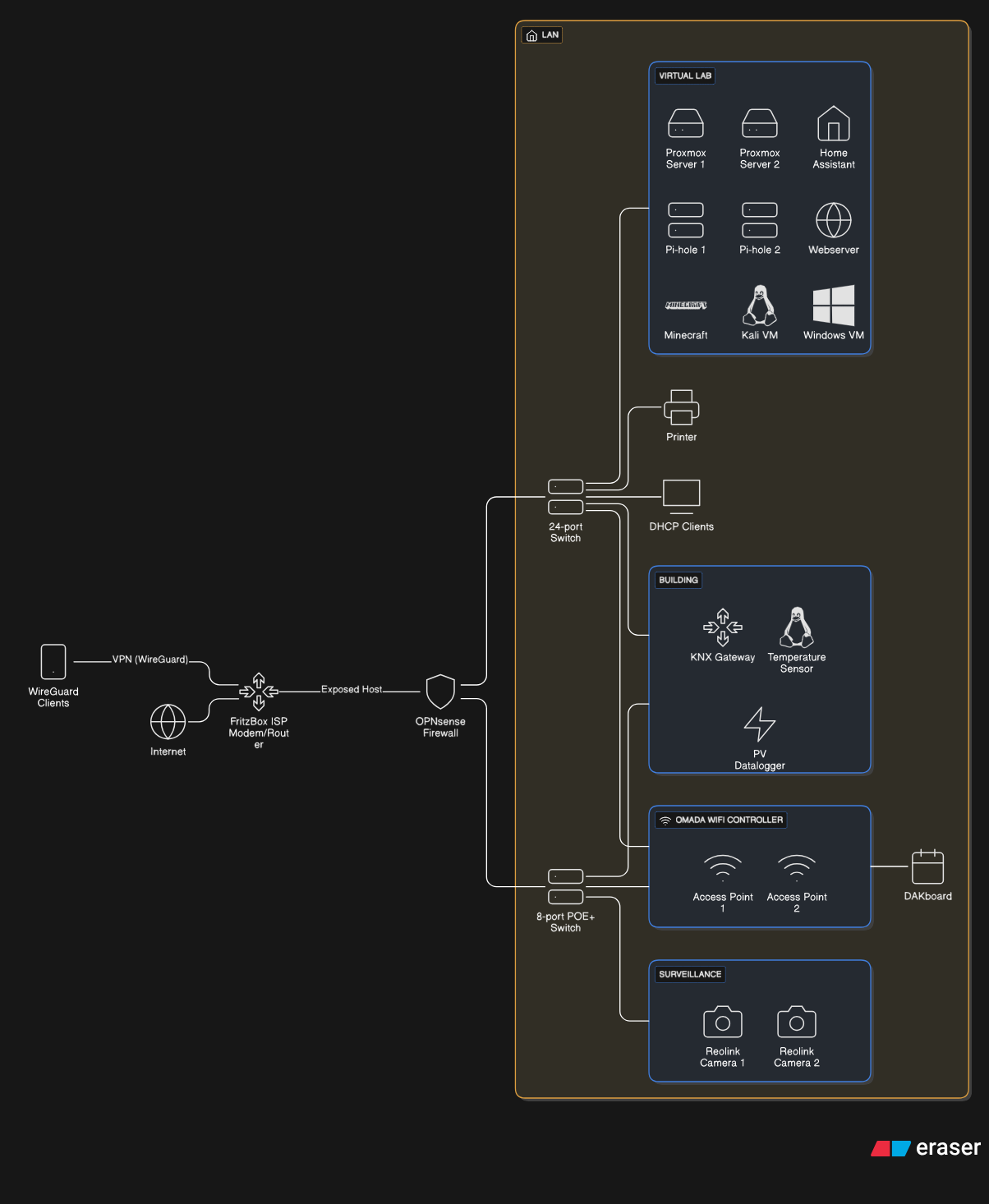
I just needed to figure a good moment to cut off my main Internet device. But the time has come and I finally managed to migrate all my settings and services.
I scheduled the final migration for December 18, 2025, evening as my wife would leave with two of the three little people living in our household and not return until a few days later. After putting to bed the left over little person incorporating a heavy discussion why there is no chance to listen to the favorit bedtimestory on Alexa this evening, I started the migration process.
The installation of OPNsense is straight forward. The configuration not so much. I prepared a lot beforehand, moving address spaces to VLAN 100 (192.168.1.0/24), setting static IP addresses for current devices and services. Even the Wifi I setup beforehand, which was a total breeze.
To my surprise and to the surprise of the left over little person, the installation of the firewall and the basic functions like having Internet were done in less than 10 minutes. So I started the bedtimestory on Alexa and went on to configure the rest of the services I needed.
Firewall and WireGuard settings
As I was having a flat network again the only real firewall rule I started with is the connection from my WAN interface for specific IP addresses to the internal network. Finally, the WireGuard client IPs were able to reach the internal network again.
Sending Mails
Using the postfix plugin I was able to make the OPNsense act as a mail realy and use Strato again as a smart host to send mails. I was first struggeling to send mails until I realized how to read logs and discovered, that I was using the wrong password 🤦.
Reverse Proxy
I am using the caddy community plugin to expose Home Assistant, so Alexa is able to reach it accordingly. A few firewall rules and a lot of debugging later it finally worked.
Alerting and Monitoring
Using the built-in service monit, the firewall will now send login events and firewall update events as I was used to it operating the Sophos UTM firewall. The setup though was quite quirky and not even remotely straight forward. But there are good resources to achieve what you need online. In general, the OPNSense community is huge and very helpful.
Automatic Configuration Backup
While i opted to put an encrypted backup to my Google Drive, I learned that this feature is broken as of now. Therefore, I decided to use the Git backup mechanism, to sync it to a private repo, which is working great.
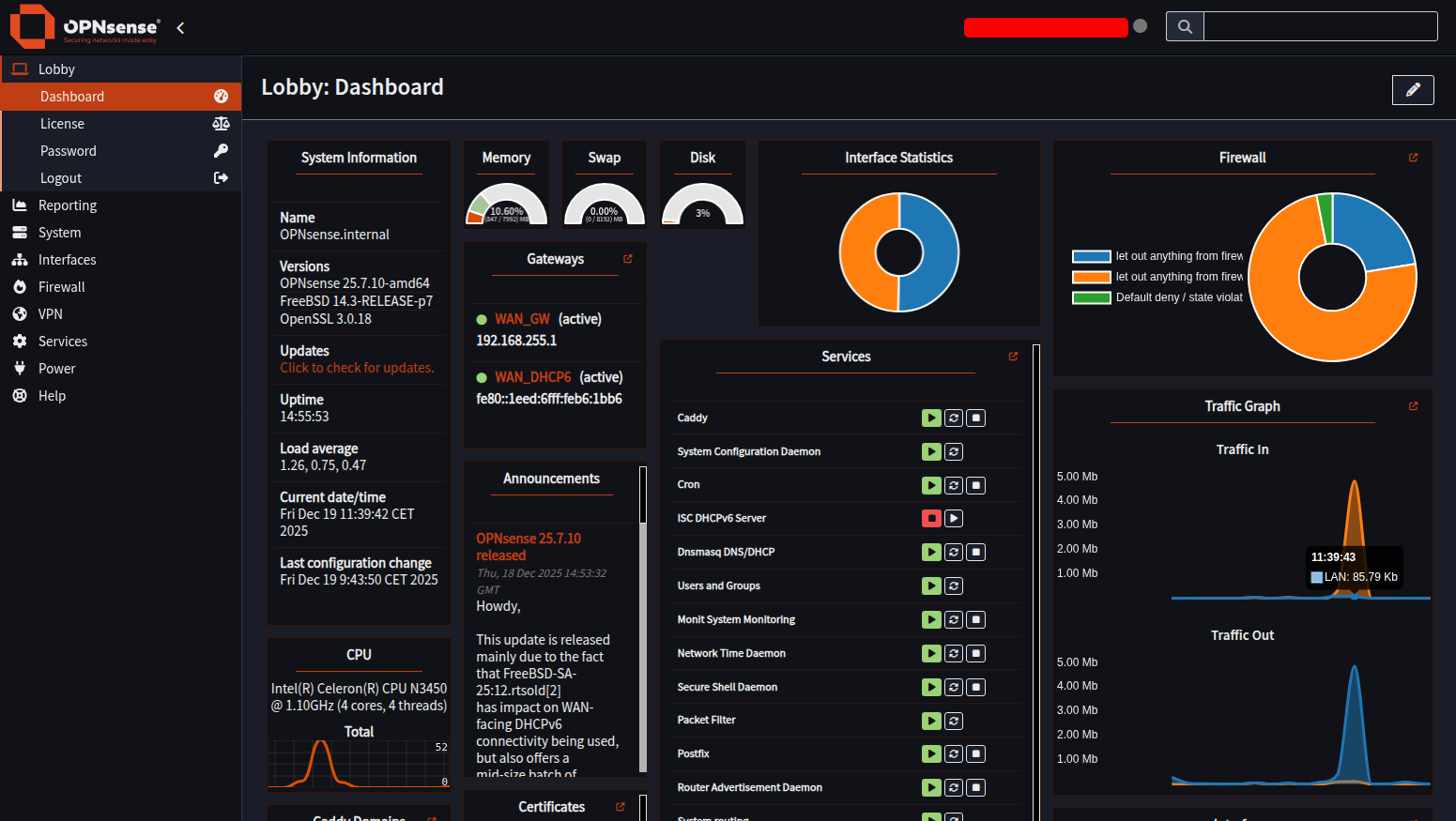
Roadmap
I still need to figure, if I can restrict connections to my Home Assistant from the Internet to only the one path Alexa needs, instead of a fully fledged exposure. This would feel safer in my opinion 🤷.
UPDATE: You just need to make two handlers and provide the following paths:
/api/alexa/smart_home/auth/token
Now only those paths will be exposed instead of the complete login and dashboard of Home Assistant.
Final Goodbye
So that’s it. That’s the story. That’s the journey. The Sophos UTM that lasted me a good 11 years is now gone and replaced by an OPNsense firewall. Farewell and god speed my good friend.
Cheers, Patrick